
People, I am SO very excited for the launch of VMware Cloud Foundation 9.0 because the work I’ve been doing for over a year has finally arrived. I’ve been muzzled so long that I’ve forgotten how it feels to publish new material and it’s been tough. So guess what? I’m back!
I’ll save the story about the past year’s journey in R&D for another day. Today, let’s talk tech!
So what did I work on in the 9.0 bits?
I planted the seeds for REAL enterprise Configuration Management on the VMware stack. Not to discount what we did in the past but we really didn’t have cohesion across the platforms – vCenter, SDDC Manager, ESXi, NSX Manager, Aria Automation, etc.
I’ll refer to the service using several names but they all refer to the same VCF Fleet Management / Configuration Drifts service: VCF Configuration Management, Config Mgmt, Configuration Drifts, Config Drifts.
In 9.0, we start with vCenter. Yeah, ok it’s not the whole stack but I was able to lay the foundation for what is to come. You MUST check it out now so you can think about how to consume it when we start bringing in more of the stack.
Why do I say this?
Because we staged capabilities like Git Repo integration, scheduling Config Drift changes, editing Config Templates. Remember – these functions are AT SCALE. I worked on Fleet Management because I came from VMware Cloud on AWS Product Management. I was the PM for VMC’s eDRS and HA services where I oversaw the VMware Host Fleet across the world in AWS.
Where is this Config Mgmt? It’s in the new VCF Operations Platform. Operations has evolved and has a new section called Fleet Management. This is where services that apply across a VCF instance will be centralized. Centralized password management, cert management, and now Configuration Management will be homed here.
VCF Ops Fleet Management is one of the emerging and maturing capabilities of the VMware portfolio and it directly addresses the common functions across our component platforms like NSX Manager, vCenter, and SDDC Manager. You can think of the password and certificate services in SDDC Manager being uplifted, rooted, and commanding those capabilities throughout an entire VCF Instance from Ops. It’s here to stay. It’s not changing. Well, ok. Maybe the name will change. 😐
What I love about how Fleet Management is coming to life in 9.0 is that fact that we show you what direction we are heading in and it’s clear we will continue to fill in the picture of these fleetwide functions. They will only get better and more powerful. What does this mean to you? It’s means we will start saving you a crap ton of time and effort from manually stitching functionality like password, cert, and config yourself.
Candidly, the functions have been brought together and are in early states. For example, config can tell you what has changed but it doesn’t fix it for you (remediation). Many of you have said that without remediation, the function has limited value and we hear you. The business is working on it and I’m even more excited for the work that is currently in development. But you shouldn’t wait because you should understand how to operate this stack now so you can increase your capability with each release. (NSX VPC’s and Transit Gateways – I’m looking at you!)
So let’s dive a little deeper.
From VCF Ops – Fleet Management, Configuration Drifts already existed from 5.2. However, it looks a lot different.
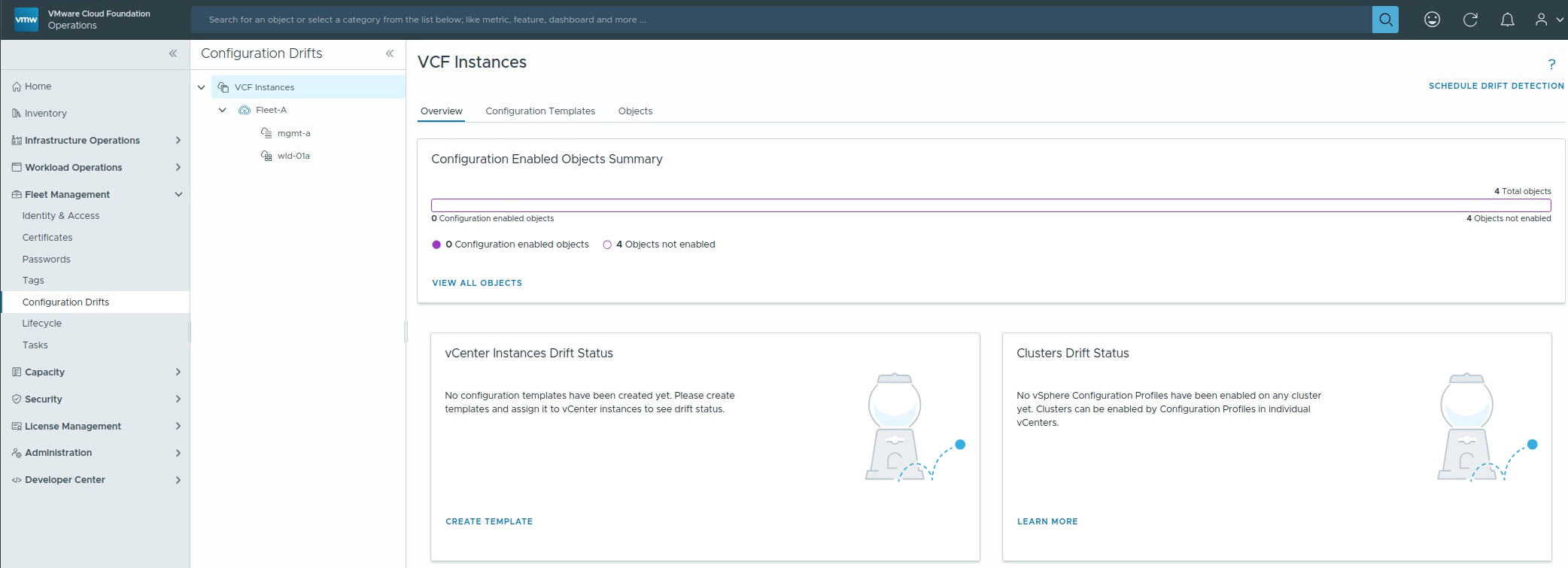
Notice there is now a secondary navigation pane to help scope your view of the function according to VCF logical constructs like at VCF Instance level and each workload domain level. At the top, the default view shows you the Config Drift service from a multi-VCF instance level. Sometimes, I refer this to view as the Global Config management view because the view here shows you objects and constructs that span all VCF Instances. This includes a summary view and the Configuration Templates. That’s right, Configuration Templates in VCF are templates that can be applied to all VCF instances, provided all instances are running 9.0 and licensed with VCF. You DO NOT have a Configuration Template per vCenter or per VCF Instance. You can literally have ONE TEMPLATE to rule them all. Ha Ha Channeling my inner LOTR here.
But there’s more! Specifically about the Configuration Templates. The flexibility designed into the Configuration Templates is meant to take advantage of existing Operations constructs like Policies and features like Notifications.
Say what?
Policies
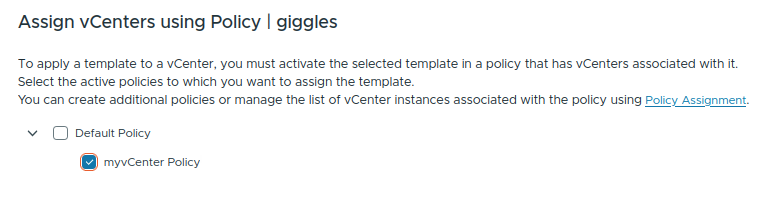
You use Operations Policies to dynamically group the logical objects (vCenter in this instance) and address them as one object. So you assign or turn on a Config Template on an Ops Policy. You can then go and modify that policy to include individual vCenters, vCenters that are a part of a VCF instance, and etc. You change whatever objects are subject to the policy and the template will be used against those objects. You don’t need to touch the Config Template again in terms of manually selecting which vCenters to apply it to. For example, you can have a policy that is assigned to workload domains in different VCF instances. Say you always have a workload domain with specific applications/workloads/vm types in every single instance of VCF. As long as all those VCF instances are tied into a single VCF 9.0 Ops instance, group them all in a policy. When you assign a Config Template to the policy, it will apply to every single vCenter in that policy scope. You didn’t have to hunt down each vCenter in each workload domain. You don’t have to undo the connection from the Config Template to a vCenter/workload domain that you remove from a policy. That’s what I call working at dynamic scale in your own datacenter.
Notifications
So if you’ve grouped all the vCenters you wanted to track in a policy, why bother hand coding every alert and notification? Use Ops’ Notification and policy (the same policy you applied the template to) to send you notifications when something changes. Wait. What? The system will tell me if vCenter settings have changed from the template?!
Yaaasss!
Introducing Schedule Drift Detection

Funny story about this capability when I was working on it last year. This was most definitely requested from customers. However, it wasn’t highlighted much during development UNTIL one day, I was conducting a feedback session and one of my services colleagues said something to the affect of “Whatever do you, get this function over the finish line” and we were a bit surprised. When asked why, he elaborated that there was no automatic way to find out if something on a vCenter changed. You had to code your own powercli script and cronjob it. This takes additional effort. In particular, he needed to know when someone flipped the SSH switch on in a vCenter. Security, you know? It was at that point that it dawned on me that the most boring bit of this functionality saved a crap ton of effort. Now, all you gotta do is create a vCenter Configuration Template with JUST ONE config setting (SSH) that you want to monitor, connect it to a policy that encompasses all your target vCenters, and schedule when you want to check those vCenters. Done. Forever. In perpetuity. Change your vCenter targets dynamically in the policy but the monitoring never stops for the target vCenters. This is “Set it & forget it”, folks!

Phew. That was a lot to cover in the first go. And I’m not done. I’ll have to come back another day/post and discuss watching config changes to ESXi clusters at scale and editing Templates.
Ready for the cherry on top?!
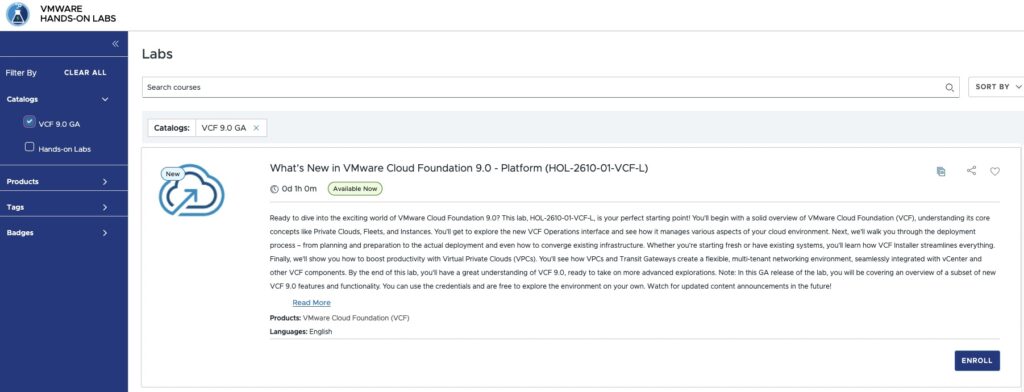
We launched new VCF 9.0 Hands on Labs today to coincide with the launch of VCF 9.0!!
So check out Config Drifts, and VPC’s, and Transit Gateways, and centralized passwords, and vSphere 9 and NSX 9 ….
VMware by Broadcom Hands on Lab
And select the What’s New in VMware Cloud Foundation 9.0 Platform (HOL-2610-01-VCF-L)
Hopefully, this has given you some idea of the power and impact the Fleet Management capabilities will be bringing you and why I’m excited!
I’m incredibly grateful for the opportunity to have kicked off the effort around VCF Configuration Management but I have now handed the work and future of Config Management to my seasoned counterparts. I’ll come back in another post to discus my new charter soon enough!